Foundation(5)
Webhacking 강좌는 여러 절로 구성되어 있습니다.
- Foundation
- Foundation(1)
- Foundation(2)
- Foundation(3)
- Foundation(4)
- Foundation(5)
- Foundation(6)
- Foundation(7)
- Foundation(8)
- Assemble
PHP , MYSQL , JS , CSS+HTML 순으로 진행하겠습니다.
PHP
PHP의 조건문 형식
조건문(if)
if로 조건을 만족할 때 실행할 작업을 정할 수 있다.
<형식>
if ( condition ) {
statement;
}
<!DOCTYPE html>
<html lang="en">
<head>
    <meta charset="UTF-8">
    <meta name="viewport" content="width=device-width, initial-scale=1.0">
    <title>Document</title>
</head>
<body>
    <h1>Conditional</h1>
    <h2>if</h2>
    <?php
    if(false) {
        echo '1<br>';              // 출력 X  :: 조건문이  false이기 떄문이다.
    }
    if(false) {
        echo "2-1<br>";            // "2-1" 출력
    } else {
        echo "2-2<br>";            // else 문은 if 조건문이 false 일 때, else에 있는 구문을 출력한다. (:: 예외처리)
    }
    if(true) {
        echo '3<br>';               // "3" 출력
    } else {
        echo '4<br>';               // if 문에 조건문이 true 이기 때문에, if 문 안에 있는 구문을 출력한다.
    }
    ?>
</body>
</html>
++ 조건문 활용
index.php 파일에서 “WEB”이라는 링크를 눌렀을 때, 홈화면이 나오도록 설정
<!DOCTYPE html>
<html lang="en">
<head>
    <meta charset="UTF-8">
    <meta name="viewport" content="width=device-width, initial-scale=1.0">
    <title>Document</title>
</head>
<body>
    <h1><a href="index.php">WEB</a></h1>
    <ol>
        <li><a href="index.php?id=HTML">HTML</a></li>
        <li><a href="index.php?id=CSS">CSS</a></li>
        <li><a href="index.php?id=JavaScript">JavaScript</a></li>
    </ol>
    <h2>
        <?php
        if(isset($_GET["id"])) {                      // 변수가 설정되었는지 확인할 수 있는 PHP 함수
            echo $_GET["id"];                         // id 값이 존재하면 if문 출력
        } else {
            echo "Welcome!";                          // id 값이 존재하지 않으면 "Welcome" 출력
        }
        ?>
    </h2>
    <?php
    if(isset($_GET['id'])) {                          // 변수가 설정되었는지 확인할 수 있는 PHP 함수
        echo file_get_contents("data/".$_GET['id']);  // 전체파일을 문자열로 읽어들이는 PHP 함수 , id 값이 존재하면 if문 출력
    } else {
        echo "This is 'index.php' file";              // id 값이 존재하지 않으면 "This is 'index.php' file" 출력
    }

    ?>
</body>
</html>
<결과>

PHP의 반복문 형식
반복문(loop)
반복문은 조건식이 참일때까지 반복적으로 작업을 진행한다.
<while문 형식>
while ( condition ){
statement;
}
<!DOCTYPE html>
<html lang="en">
<head>
    <meta charset="UTF-8">
    <meta name="viewport" content="width=device-width, initial-scale=1.0">
    <title>Document</title>
</head>
<body>
    <h1>while</h1>
    <?php
    $i = 0;                   // 변수 i의 값을 0으로 지정
    while($i < 3){            // i는 0 이므로 조건문의 값이 참
        echo '2<br>';         // '2' 출력
        $i += 1;              // i 의 값에 1을 더하고 저장 :: 현재 i의 값 == 1
    }                         // 반복문 특성 때문에 조건이 불충족 할때까지 조건문으로 되돌아간다.
                              // i의 값이 3이 될 때 반복문에서 빠져나옴 :: '2'를 3번 출력
    ?>
</body>
</html>
PHP의 배열에 형식
배열(Array)
한번에 하나 이상의 값들을 담을 수 있는 특별한 변수이다.
<배열의 형식>
$배열이름 = array(‘value’);
<!DOCTYPE html>
<html lang="en">
<head>
    <meta charset="UTF-8">
    <meta name="viewport" content="width=device-width, initial-scale=1.0">
    <title>Document</title>
</head>
<body>
    <h1>Array</h1>
    <?php
    $coworkers = array('egoing', 'leezche', 'duru', 'taeho');   //  coworkers라는 변수안에 배열을 생성
    echo $coworkers[2];                                         // 'duru' 출력
    var_dump(count($coworkers));                                //  count 함수 :: 배열의 길이를 반환하는데 사용된다.
                                                                //  'int 4' 출력 :: 배열 안에 값이 총 4개 이기 떄문이다.
    array_push($coworkers, "graphittie");                       //  변수 'coworkers'안에 'graphittie'값을 마지막 자리에 추가
    var_dump($coworkers);
                                                                /*
                                                                <출력 결과>
                                                                0 => string 'egoing' (length=6)
                                                                1 => string 'leezche' (length=7)
                                                                2 => string 'duru' (length=4)
                                                                3 => string 'taeho' (length=5)
                                                                4 => string 'graphittie' (length=10)
                                                                 */
    ?>
</body>
</html>
++ 반복문과 조건문의 활용
index.php 파일을 활용하여 data파일에 내용을 추가했을 때 즉각 변경되는 페이지를 만들려고 한다.
<!DOCTYPE html>
<html lang="en">
<head>
    <meta charset="UTF-8">
    <meta name="viewport" content="width=device-width, initial-scale=1.0">
    <title>Document</title>
</head>
<body>
    <h1><a href="index.php">WEB</a></h1>
    <ol>
    <?php
        $list = scandir('./data');                    // scandir :: 지정된 디렉토리의 파일 및 디렉토리의 배열을 반환하는 함수

        $i = 0;

        while($i < count($list)) {                    // count 함수를 이용하여 전체 디렉토리 수를 출력한다.
            if($list[$i] != '.' && $list[$i] != '..') {              /* scandir 은 현재 디렉토리('.')와 부모 디렉토리('..')
                                                                        또한 출력함으로 이를 제거하기 위해 논리 AND를 사용하였다.*/
                echo "<li><a href=\"index.php?id=$list[$i]\">$list[$i]</a></li>\n";  // 출력문
            }
            $i += 1;                                  // i값 증가
        }

        /*  EX)
        echo "<li>$list[0]</li>\n";
        echo "<li>$list[1]</li>\n";
        echo "<li>$list[2]</li>\n";
        echo "<li>$list[3]</li>\n";
        echo "<li>$list[4]</li>\n";
        echo "<li>$list[5]</li>\n";
        */
     ?>
    </ol>
    <h2>
        <?php
        if(isset($_GET["id"])) {                      // 변수가 설정되었는지 확인할 수 있는 PHP 함수
            echo $_GET["id"];                         // id 값이 존재하면 if문 출력
        } else {
            echo "Welcome!";                          // id 값이 존재하지 않으면 "Welcome" 출력
        }
        ?>
    </h2>
    <?php
    if(isset($_GET['id'])) {                          // 변수가 설정되었는지 확인할 수 있는 PHP 함수
        echo file_get_contents("data/".$_GET['id']);  // 전체파일을 문자열로 읽어들이는 PHP 함수 , id 값이 존재하면 if문 출력
    } else {
        echo "This is 'index.php' file";              // id 값이 존재하지 않으면 "This is 'index.php' file" 출력
    }

    ?>
</body>
</html>
<결과>
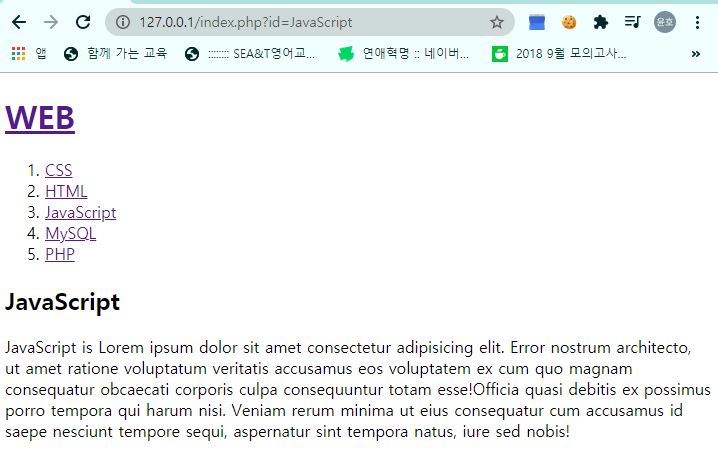
data 디렉토리에 파일을 추가할 때 마다 list가 추가되는 것을 볼 수 있다.
MySQL
MySQL UPDATE(데이터 수정)
Webhacking_foundation(4)에 이어서…
EX) 테이블에 'Exciting'를 'Happy'로, '신나는'을 '행복한'으로 바꾸고 싶을 때
- 만들었던 DB에 접속한다
USE opentutorials;
-
UPDATE 구문을 이용해 데이터를 수정한다.
 UPDATE 필드이름

 SET 테이블이름        // UPDATE 구문 형식

 [WHERE 조건]
UPDATE topic SET description=’행복한’, title=’Happy’ WHERE id=2;
- 데이터가 수정되었는지 확인한다.
SELECT * FROM topic;

MySQL DELETE(데이터 삭제)
EX) 테이블에서 id값이 5인 데이터를 삭제하고 싶을 때
- 만들었던 DB에 접속한다
USE opentutorials;
-
DELETE 구문을 이용해 데이터를 수정한다.
 DELETE FROM 테이블명   // DELETE 구문 형식

 [WHERE 조건]
DELETE FROM topic WHERE id = 5;
- 데이터가 수정되었는지 확인한다.
SELECT * FROM topic;

JavaScript
JS 조건문
조건문(if)
if로 조건을 만족할 때 실행할 작업을 정할 수 있다.
<형식>
if ( condition ) {
statement;
}
<!DOCTYPE html>
<html lang="en">
  <head>
    <meta charset="UTF-8" />
    <meta name="viewport" content="width=device-width, initial-scale=1.0" />
    <title>Document</title>
  </head>
  <body>
    <h1>Conditional statements</h1>
    <h2>Program</h2>
    <script>
      document.write("1<br>");
      document.write("2<br>");
      document.write("3<br>");
      document.write("4<br>");
    </script>
    <h2>IF - true</h2>
    <script>
      document.write("1<br>");
      if (true) {
        document.write("2<br>"); // if문이 true이기 때문에 '2' 출력
      } else {
        document.write("3<br>");
      }
      document.write("4<br>");
    </script>
    <h2>IF - false</h2>
    <script>
      document.write("1<br>");
      if (false) {
        document.write("2<br>"); // if문이 false이기 때문에 예외처리 되어
      } else {
        // '3' 출력
        document.write("3<br>");
      }
      document.write("4<br>");
    </script>
  </body>
</html>
++ 조건문 활용
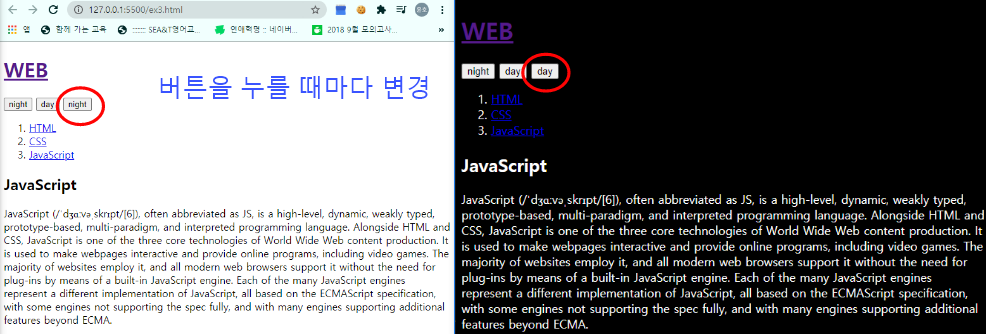
ex.3 파일을 활용하여 ‘night’와 ‘day’ 버튼을 하나의 버튼이 되도록 설정
<!DOCTYPE html>
<html lang="en">
  <head>
    <meta charset="UTF-8" />
    <meta name="viewport" content="width=device-width, initial-scale=1.0" />
    <title>Document</title>
  </head>
  <body>
    <h1><a href="index.html">WEB</a></h1>

    <input
      id="night_day"
      type="button"
      value="night"
      onclick="
    if(document.querySelector('#night_day').value === 'night'){         // querySelector의 값이 night일 때, 야간모드로 변환
      document.querySelector('body').style.backgroundColor = 'black';
      document.querySelector('body').style.color = 'white';
      document.querySelector('#night_day').value = 'day';               // 다시 누르면 해제 하기 위해서, querySelector 값을
    } else {                                                            // day로 설정
      document.querySelector('body').style.backgroundColor = 'white';   // querySelector의 값이 white일 때, 야간모드 해제
      document.querySelector('body').style.color = 'black';
      document.querySelector('#night_day').value = 'night';             // 다시 누르면 야간 모드를 하기 위해서,
    }                                                                   // querySelector 값을  'night' 로 설정
    "
    />
    <!-- 돌고 도는 조건문 완성 -->

    <ol>
      <li><a href="1.html">HTML</a></li>
      <li><a href="2.html">CSS</a></li>
      <li><a href="3.html">JavaScript</a></li>
    </ol>
    <h2>JavaScript</h2>
    <p>
      JavaScript (/ˈdʒɑːvəˌskrɪpt/[6]), often abbreviated as JS, is a
      high-level, dynamic, weakly typed, prototype-based, multi-paradigm, and
      interpreted programming language. Alongside HTML and CSS, JavaScript is
      one of the three core technologies of World Wide Web content production.
      It is used to make webpages interactive and provide online programs,
      including video games. The majority of websites employ it, and all modern
      web browsers support it without the need for plug-ins by means of a
      built-in JavaScript engine. Each of the many JavaScript engines represent
      a different implementation of JavaScript, all based on the ECMAScript
      specification, with some engines not supporting the spec fully, and with
      many engines supporting additional features beyond ECMA.
    </p>
  </body>
</html>
<결과>
JS 리팩토링 중복의 제거
리팩토링
코드의 중복을 제거하고 의도를 명확히 드러냄으로써 유지보수를 편리하게 만들고, 코드에 기능을 쉽게 추가할 수 있다.
ex.3 파일을 활용하여 리팩토링하기
원본 코드
<!DOCTYPE html>
<html lang="en">
  <head>
    <meta charset="UTF-8" />
    <meta name="viewport" content="width=device-width, initial-scale=1.0" />
    <title>Document</title>
  </head>
  <body>
    <h1><a href="index.html">WEB</a></h1>

    <input
      id="night_day"
      type="button"
      value="night"
      onclick="
    if(document.querySelector('#night_day').value === 'night'){
      document.querySelector('body').style.backgroundColor = 'black';
      document.querySelector('body').style.color = 'white';
      document.querySelector('#night_day').value = 'day';
    } else {
      document.querySelector('body').style.backgroundColor = 'white';
      document.querySelector('body').style.color = 'black';
      document.querySelector('#night_day').value = 'night';
    }
    "
    />

    <ol>
      <li><a href="1.html">HTML</a></li>
      <li><a href="2.html">CSS</a></li>
      <li><a href="3.html">JavaScript</a></li>
    </ol>
    <h2>JavaScript</h2>
    <p>
      JavaScript (/ˈdʒɑːvəˌskrɪpt/[6]), often abbreviated as JS, is a
      high-level, dynamic, weakly typed, prototype-based, multi-paradigm, and
      interpreted programming language. Alongside HTML and CSS, JavaScript is
      one of the three core technologies of World Wide Web content production.
      It is used to make webpages interactive and provide online programs,
      including video games. The majority of websites employ it, and all modern
      web browsers support it without the need for plug-ins by means of a
      built-in JavaScript engine. Each of the many JavaScript engines represent
      a different implementation of JavaScript, all based on the ECMAScript
      specification, with some engines not supporting the spec fully, and with
      many engines supporting additional features beyond ECMA.
    </p>
  </body>
</html>
리팩토링 한 코드
<!DOCTYPE html>
<html lang="en">
  <head>
    <meta charset="UTF-8" />
    <meta name="viewport" content="width=device-width, initial-scale=1.0" />
    <title>Document</title>
  </head>
  <body>
    <h1><a href="index.html">WEB</a></h1>

    <input
      id="night_day"
      type="button"
      value="night"
      onclick="       // target이라는 변수 안에 값을 정의하고 같은 부분을
      var target = document.querySelector('body');                    // target으로 바꿔서 보기 쉽게 만든다.
      if(this.value === 'night'){                                     // this :: 호출에 따라 달라지는 것
      target.style.backgroundColor = 'black';                         /* doucument.querySelector('#night_day2')는 자기자신
                                                                        을 가리키고 있으므로 this로 바꾼다. */
      target.style.color = 'white';
      this.value = 'day';
    } else {
      target.style.backgroundColor = 'white';
      target.style.color = 'black';
      this.value = 'night';
    }
    "
    />

    <ol>
      <li><a href="1.html">HTML</a></li>
      <li><a href="2.html">CSS</a></li>
      <li><a href="3.html">JavaScript</a></li>
    </ol>
    <h2>JavaScript</h2>
    <p>
      JavaScript (/ˈdʒɑːvəˌskrɪpt/[6]), often abbreviated as JS, is a
      high-level, dynamic, weakly typed, prototype-based, multi-paradigm, and
      interpreted programming language. Alongside HTML and CSS, JavaScript is
      one of the three core technologies of World Wide Web content production.
      It is used to make webpages interactive and provide online programs,
      including video games. The majority of websites employ it, and all modern
      web browsers support it without the need for plug-ins by means of a
      built-in JavaScript engine. Each of the many JavaScript engines represent
      a different implementation of JavaScript, all based on the ECMAScript
      specification, with some engines not supporting the spec fully, and with
      many engines supporting additional features beyond ECMA.
    </p>
  </body>
</html>