Foundation(4)
Webhacking 강좌는 여러 절로 구성되어 있습니다.
- Foundation
- Foundation(1)
- Foundation(2)
- Foundation(3)
- Foundation(4)
- Foundation(5)
- Foundation(6)
- Foundation(7)
- Foundation(8)
- Assemble
PHP , MYSQL , JS , CSS+HTML 순으로 진행하겠습니다.
PHP
PHP의 함수
<!DOCTYPE html>
<html lang="en">
<head>
    <meta charset="UTF-8">
    <meta name="viewport" content="width=device-width, initial-scale=1.0">
    <title>Document</title>
</head>
<body>
<h1>function</h1>
<?php
<!DOCTYPE html>
<html lang="en">
<head>
    <meta charset="UTF-8">
    <meta name="viewport" content="width=device-width, initial-scale=1.0">
    <title>Document</title>
</head>
<body>
<h1>function</h1>
<?php
$str = "Lorem, ipsum dolor sit amet consectetur adipisicing elit.
Qui iure eaque, odio, ullam reprehenderit itaque incidunt

accusamus explicabo labore ipsa perspiciatis.
Quidem, quis unde? Provident rem tempora voluptate quod est?";
echo $str;
?>

<h2>strlen()</h2>
<?php
echo strlen($str);          //  문자열의 길이를 구하는 함수입니다. ==> 226 출력
?>

<h2>nl2br</h2>
<?php
echo nl2br($str);          //  이 함수는 문자열 중 "\n" 을 "<br>" 로 변환한다.
?>
</body>
</html>
이처럼 PHP에서는 미리 작성되어 제공되는 많은 내장 함수들이 있다.
++ 함수 활용
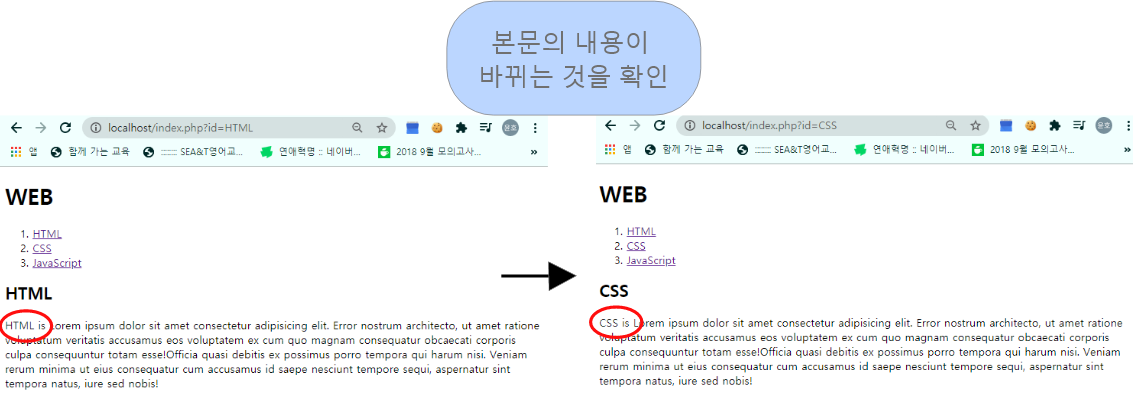
지난번 파라미터 활용에서 추가하여 내용도 변경하도록 설정
<!DOCTYPE html>
<html lang="en">
<head>
    <meta charset="UTF-8">
    <meta name="viewport" content="width=device-width, initial-scale=1.0">
    <title>Document</title>
</head>
<body>
    <h1>WEB</h1>
    <ol>
        <li><a href="index.php?id=HTML">HTML</a></li>
        <li><a href="index.php?id=CSS">CSS</a></li>
        <li><a href="index.php?id=JavaScript">JavaScript</a></li>
    </ol>
    <h2>
        <?php
        echo $_GET["id"];
        ?>
    </h2>
    <?php
    echo file_get_contents("data/".$_GET['id']);  // 전체파일을 문자열로 읽어들이는 PHP 함수
    ?>                                            // HTML, CSS, JS의 본문이 들어있는 경로
</body>
</html>
<결과>
PHP의 Boolean과 비교연산자
Boolean
PHP에서 Boolean은 상수인 true와 false를 사용해 나타내며, 대소문자를 구분 X
비교연산자
두 값을 비교하는 연산자 (Ex. ‘==’ , ‘>=’ , ‘<’ etc…)
<!DOCTYPE html>
<html lang="en">
<head>
<meta charset="UTF-8">
<meta name="viewport" content="width=device-width, initial-scale=1.0">
<title>Document</title>
</head>
<body>
<h1>Comparison Operators & Boolean data type </h1>
<?php
var_dump(11); // 변수의 정보를 출력하는 함수입니다. ==> int 11 출력
var_dump(1==2); // "==" 비교연산자 중 하나로 좌항과 우항의 값이 같은지 확인 ==> false 출력
var_dump(1>=1); // true 출력
?>
</body>
</html>
MySQL
MySQL INSERT(데이터 추가)
Webhacking_foundation(3)에 이어서…
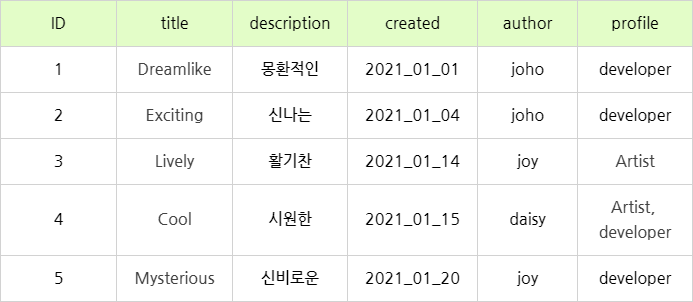
내가 만들 테이블
- 만들었던 DB에 접속한다
USE opentutorials;
-
INSERT 구문을 이용해 데이터를 넣는다.
INSERT INTO 테이블이름(필드이름1, 필드이름2, 필드이름3, ...)

VALUES (데이터값1, 데이터값2, 데이터값3, ...)     // INSERT 구문 형식
INSERT INTO topic (title,description,created,author,profile) VALUES(‘Dreamlike’, ‘몽환적인’, ‘2021-01-01’, ‘joho’, ‘developer’);
INSERT INTO topic (title,description,created,author,profile) VALUES(‘Exciting’, ‘신나는’, ‘2021-01-04’, ‘joho’, ‘developer’);
INSERT INTO topic (title,description,created,author,profile) VALUES(‘Lively’, ‘활기찬’, ‘2021-01-14’, ‘joy’, ‘Artist’);
INSERT INTO topic (title,description,created,author,profile) VALUES(‘Cool’, ‘시원한’, ‘2021-01-15’, ‘daisy’, ‘Artist, developer’);
INSERT INTO topic (title,description,created,author,profile) VALUES(‘Mysterious’, ‘신비로운’, ‘2021-01-20’, ‘joy’, ‘developer’);
- 데이터가 잘들어갔는지 확인한다.
SELECT * FROM topic;

MySQL SELECT(데이터 조회)
SELECT 필드이름

FROM 테이블이름        // SELECT 구문 형식

[WHERE 조건]
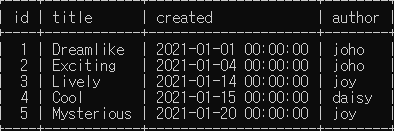
테이블 중 id, title, create, author만 화면에 출력하기
SELECT id,title,created,author FROM topic;
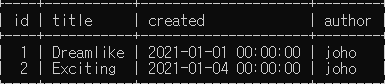
테이블 중 author에 joho만 보고 싶다.
SELECT id,title,created,author FROM topic WHERE author=’joho’;
정렬 순서를 반대로 하고 싶다.
SELECT id,title,created,author FROM topic WHERE author=’joho’ ORDER BY id DESC;

++ 추가적으로 데이터양이 방대한 DB서버에서는 화면에 출력되는 정보에 제약을 걸어야 한다. ==> ‘LIMIT (화면에 출력되는 데이터 양)’
JavaScript
JS 제어할 태그 선택하기
<!DOCTYPE html>
<html lang="en">
  <head>
    <meta charset="UTF-8" />
    <meta name="viewport" content="width=device-width, initial-scale=1.0" />
    <title>Document</title>
  </head>
  <body>
    <h1><a href="index.html">WEB</a></h1>
    <input
      type="button"
      value="night"
      onclick="
    document.querySelector('body').style.backgroundColor = 'black';  //  .querySelector()는 CSS 선택자로 요소를 선택하게 해준다.
    document.querySelector('body').style.color = 'white';            //  'night' 버튼을 눌렀을 때, 배경화면은 검정, 나머지 글씨
                                                                     //  색은 하얀색으로 변환
    "
    />
    <input
      type="button"
      value="day"
      onclick="
    document.querySelector('body').style.backgroundColor = 'white';  //  'day' 버튼을 눌렀을 때, 배경화면은 하얀색, 나머지는
    document.querySelector('body').style.color = 'black';            //  검정색으로 변환
    "
    />
    <ol>
      <li><a href="1.html">HTML</a></li>
      <li><a href="2.html">CSS</a></li>
      <li><a href="3.html">JavaScript</a></li>
    </ol>
    <h2>JavaScript</h2>
    <p>
      JavaScript (/ˈdʒɑːvəˌskrɪpt/[6]), often abbreviated as JS, is a
      high-level, dynamic, weakly typed, prototype-based, multi-paradigm, and
      interpreted programming language. Alongside HTML and CSS, JavaScript is
      one of the three core technologies of World Wide Web content production.
      It is used to make webpages interactive and provide online programs,
      including video games. The majority of websites employ it, and all modern
      web browsers support it without the need for plug-ins by means of a
      built-in JavaScript engine. Each of the many JavaScript engines represent
      a different implementation of JavaScript, all based on the ECMAScript
      specification, with some engines not supporting the spec fully, and with
      many engines supporting additional features beyond ECMA.
    </p>
  </body>
</html>
<결과>

JS 비교 연산자와 Boolean
Boolean
Boolean은 상수인 true와 false를 사용해 나타내며, 대소문자를 구분 X
비교연산자
두 값을 비교하는 연산자 (Ex. ‘==’ , ‘>=’ , ‘<’ etc…)
<!DOCTYPE html>
<html lang="en">
<head>
<meta charset="UTF-8" />
<meta name="viewport" content="width=device-width, initial-scale=1.0" />
<title>Document</title>
</head>
<body>
<h1>Comparison operator & Boolean</h1>
<h2>===</h2>
<h3>1===1</h3>
<script>
document.write(1 === 1); // True 출력
</script>
<h3>1===2</h3>
<script>
document.write(1 === 2); // False 출력
</script>
<h3>1<2</h3>
<!-- '<'' == '<'' -->
<script>
document.write(1 < 2); // True 출력
</script>
</body>
</html>